
Scenarios when RWO is appropriate
Rental items that are lost or damaged in transit can be RWO'd upon approval if they don't want a replacement:
- Example: A student purchases a rental item accidentally. It's already shipped and unable to be cancelled. They want to return it for a refund now that tracking is marked delivered, but the on-campus delivery location says they don't have it. To avoid the student being charged later on once the due date passes, that lost rental would be RWO'd.
- Example: A student receives a empty package and can't wait for a replacement. To protect the customer you can RWO the rental and refund the order in order item admin (OIA).
Rentals with more than 3 eCampus stickers can be RWO'd:
- Example: A student receives a rental that’s a little torn up, but still usable. They reach out so they aren't charged upon return. (I like to ask how many eCampus stickers are on the cover or get an image of the book) If we can see that this item has been rented out multiple times, instead of making the student return the item, we could RWO after gaining team lead approval.
Old rentals are showing overdue, but show tracking information was created:
- Example: A student who hasn't ordered since last year placed a new order that is on RHOL. They are 100% sure they returned their rentals from last year and have the tracking info to prove it. However, The tracking info is too old to look up after about 120 days. As a courtesy, and if approved by Kandice, those rentals could be RWO'd.
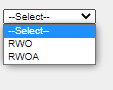
In cases where the customer reaches out and they indicate that their rental item was only an access card/code you would move the order to RWOA - after confirming that what we sent is actually just an access card. This can be done using the format in monty, searching for the item on the publisher website, and even using a competitors website.
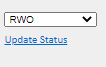
How to RWO/RWOA:
Comments
0 comments
Please sign in to leave a comment.